AI Image Generation vs. Traditional Stock Photography: Which Should Designers Use?

Stock photography asks, “Which existing image comes closest to the brief?” AI image generation asks, “What image would serve this brief?” For designers, that is a meaningful difference.
If you are creating campaign concepts, branded backgrounds, editorial illustrations, or imagined product environments, AI deserves to be your first option—not merely the emergency exit after an unsuccessful stock search. It gives you more room to direct the composition instead of redesigning around somebody else’s photograph.
But generating an attractive scene is not the same as documenting reality, preserving an exact product, or securing the rights a client needs. The useful comparison is not “Which technology is better?” It is “Which route gets this particular design to an approved, trustworthy, production-ready result?”
The short answer: use AI for designed scenes, photography for real-world claims
Start by identifying the image’s job. Is it communicating an idea, or making a claim about something that actually exists?
- For a conceptual website hero, an abstract campaign visual, or an imaginary environment, start with AI. Composition and art direction matter more than whether the scene happened.
- For a photograph of a particular place, event, or historical moment, use verified photography. A plausible reconstruction is not documentation.
- For product lifestyle imagery, consider a hybrid: generate the environment, then manually composite the approved product photograph when exact fidelity matters.
- For a straightforward supporting photograph that already exists and fits the layout, stock may be the quickest answer.
- For actual employees, customers, facilities, or testimonials, use authorized photographs of those people and places. Neither generic stock nor invented AI people should masquerade as the real thing.
- For a coordinated family of imagined visuals, test reference-led AI before spending hours searching for unrelated stock images that almost match.
My recommendation is AI-first for constructed marketing imagery, photography-first for factual representation, and hybrid production for branded assets that must remain exact.
That is a stronger position than “both have pros and cons.” It gives each approach a specific responsibility—and stops stock photography from winning simply because it was the default five years ago.
Stock’s biggest creative problem is not image quality. It is interchangeability.
A stock photograph can be beautifully exposed, technically immaculate, and completely wrong for your brand.
You know the aesthetic: six colleagues enjoying a meeting with the emotional intensity of a surprise wedding proposal. A businessman shaking hands with another businessman, thereby establishing that business has occurred. A woman laughing at a salad that apparently has an excellent tight five.
These images are easy to recognize because their message is so broadly applicable. Unfortunately, “applicable to almost anyone” is not usually the goal of brand design.
The compromise happens inside the layout
Consider a homepage that needs a subject on the right, quiet space on the left, warm directional lighting, and a restrained green palette. You find a stock photograph with the correct subject—but the subject is centered, the background is busy, and everything is aggressively blue.
Now the headline needs a dark overlay. The crop removes an important detail. The brand palette becomes negotiable. The design starts accommodating the photograph instead of the photograph supporting the design.
AI gives you a way to request those compositional requirements together. It may take iteration, but you can direct the empty space, lighting, environment, and visual hierarchy rather than only choosing among existing frames.
AI can produce clichés, too
Replacing “corporate handshake” with “futuristic innovation, cinematic, ultra-detailed” does not automatically improve anything. You may simply receive a glowing blue corridor full of expensive-looking nonsense.
The advantage is not that AI possesses better taste. The advantage is that your taste can enter earlier in the process.
Write requirements such as “ordinary working environment,” “restrained contrast,” “unpolished materials,” “one clear focal point,” or “leave the upper third visually quiet.” Describe the actual design problem instead of ordering a bucket of impressive adjectives.
Good stock remains useful. But for a distinctive campaign, repeatedly settling for the closest available photograph can impose a creative ceiling that generation lets you challenge.
Cost: compare approved assets, not subscription prices or generation counts
Cost is one of the strongest arguments against relying heavily on paid stock—particularly premium purchases, irregular buying, and projects that need many different visuals. However, “stock is always more expensive” is not defensible.
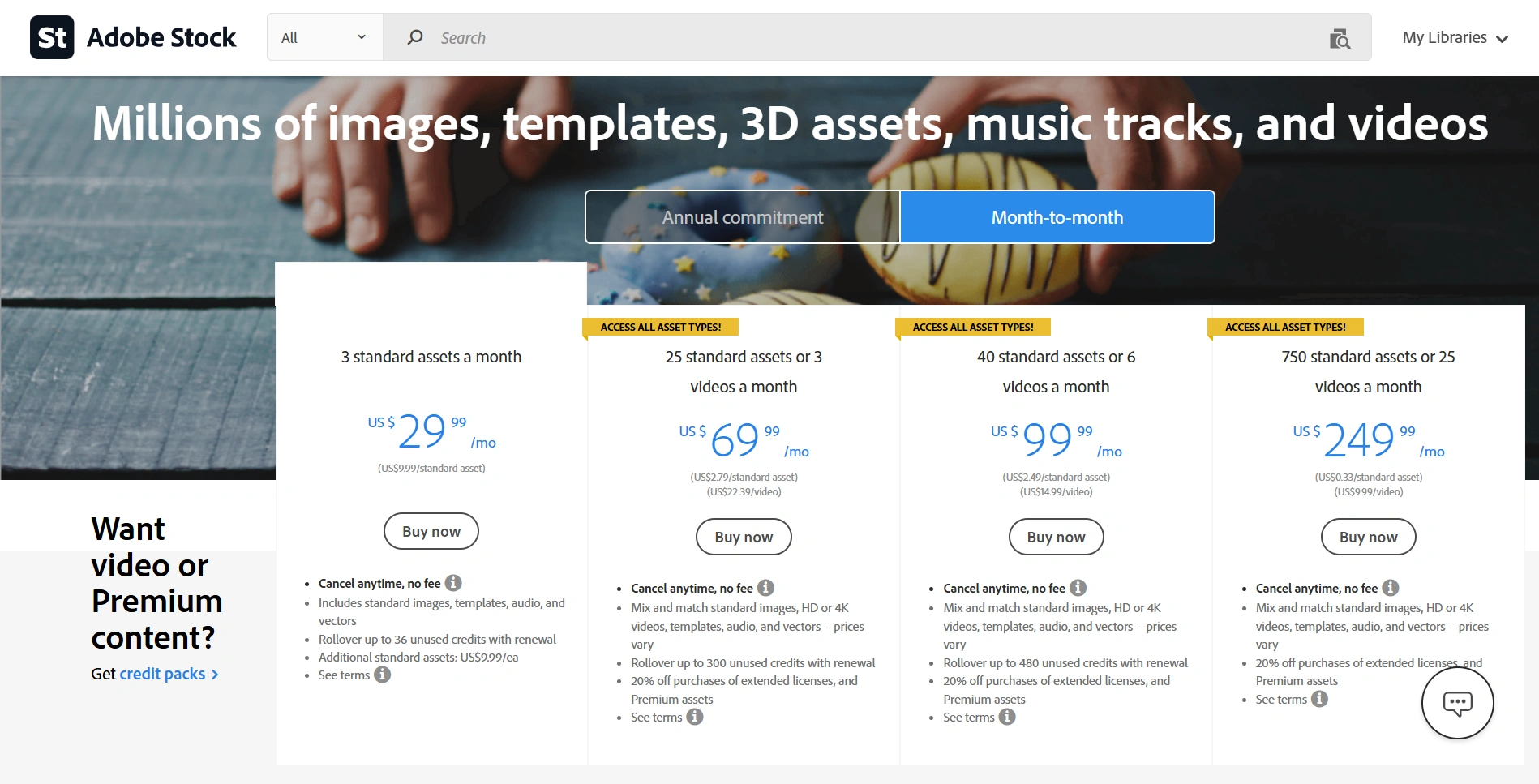
The public U.S. pricing pages illustrate the range. Getty Images’ download pricing lists a single large-image download at $499. Meanwhile, Adobe Stock’s plans include an annual commitment, paid monthly, offering 10 standard assets for $29.99 per month. Those are very different purchasing situations. Check current checkout terms, regional pricing, and the license you actually need.
Free photography also exists. The Unsplash license permits free commercial and noncommercial use, subject to its restrictions. So the AI argument should not depend on pretending every photograph carries a premium agency price tag.
The hidden expense is getting to “usable”
For stock, include the license or allocated subscription cost, search time, retouching, layout adaptation, and any additional permissions or license upgrades.
For AI, include the generation platform, applicable credits, any workflow tools, unsuccessful iterations, review, cleanup, and final compositing.
A useful calculation is:
Cost per approved asset = total acquisition or generation expense, plus production labor, divided by the number of assets that actually pass review.
For illustration, at an internal labor rate of $60 per hour, an extra half-hour repairing an AI result adds $30. That can outweigh several inexpensive stock licenses. Conversely, an hour spent hunting for a stock image that still needs extensive adaptation can erase its apparent price advantage.
AI becomes especially attractive when a brief needs multiple constructed scenes, frequent revisions, or exploratory directions. You can pursue those directions without buying a separate photograph for every one. But generation is not automatically free: Adobe’s Generative Credits FAQ explains that access and consumption depend on the feature, model, output, and plan.
Also separate experiments from deliverables. Forty generated candidates are not forty finished assets. The number that matters is how many satisfy the brief without becoming a restoration project.
Reference images make AI easier to art-direct
For designers, reference-led generation is often more useful than starting with text alone. It lets you bring approved visual material into the process: a product photograph, a client-created illustration, a campaign image, or another asset you have permission to use.
That changes the task from “invent something vaguely premium” to “explore this visual direction using these specific starting points.”
Turn a studio photograph into a scene brief
Suppose an e-commerce client has a clean studio photograph of a blue travel mug. The campaign needs breakfast-at-home, outdoor-weekend, and office-desk compositions.
A stock search might find excellent kitchens and campsites. It will not conveniently find the client’s mug already sitting in them.
With a reference-compatible model, the studio image can guide generation while your prompt describes the environment and composition. For example:
“Use the supplied blue travel-mug photograph as the subject reference. Create a natural morning scene on a pale plaster kitchen counter. Position the mug in the right third, with a quiet, low-detail area on the left for a headline. Soft window light from the left, believable contact shadows, restrained cream and blue palette. Avoid additional lettering, decorative graphics, and excessive gloss.”
This is a design brief, not a spell. You are specifying the relationships that matter: subject placement, copy space, lighting, material character, and brand atmosphere.
The output still needs inspection. A reference guides interpretation; it does not guarantee that the model preserves the exact silhouette, lid, label, color, or logo.
Use brand assets without outsourcing brand accuracy
A client logo or approved brand graphic can also be supplied as a reference when exploring branded compositions: an event backdrop, a retail display concept, or a campaign scene that needs room for identity elements.
For final artwork, however, place the original logo yourself when accuracy matters. Do not ask a generated interpretation to become the brand’s master artwork. A slightly altered wordmark is not “creative exploration” once it reaches the client’s advertisement.
The same principle applies to packaging, product claims, and interface screenshots. Let AI help construct the scene; retain original approved assets for elements that must be exact.
Separate what may change from what must not
Before generating, write two lists. The first contains variables: environment, props, lighting, camera angle, and available copy space. The second contains nonnegotiables: product geometry, label text, logo proportions, safety features, or factual claims.
If a nonnegotiable cannot be trusted to generation, preserve it through manual compositing. That hybrid approach is not a concession. It is often the most sensible way to combine AI’s scene-building flexibility with production-level control.
A practical Photoshop workflow for building a reference-led image library
Once a reference-led direction works, the challenge becomes repetition. Generating one promising scene is manageable. Producing a library of scene and composition options can involve a lot of prompt entry, waiting, variation selection, exporting, and naming.
Bulk AI Image Creator: Batch Generative Fill fits this stage. It is a third-party Photoshop plugin that automates Photoshop’s Generative Fill across a CSV prompt list. It does not operate an independent image-generation backend; it automates the production workflow around Photoshop’s models.
Build a controlled prompt set
For the travel-mug campaign, start with three environments and two composition treatments per environment. That gives you six deliberately different prompts—not 100 lightly reworded requests for “beautiful product photography.”
- Create a spreadsheet with TEXT PROMPTS in cell A1. Put one complete prompt per row beneath it in Column A, then export a CSV. Keep other columns empty; use normal CSV quoting for prompts containing commas.
- Choose one model for the batch. Reference-compatible choices include Gemini 3 (Nano Banana Pro), Gemini 3.1 (Nano Banana 2), and FLUX2 Pro. Confirm that your chosen model is available through your Photoshop installation and Adobe account.
- Enable Attach Reference Images and select a folder containing one or two supported reference files. For this example, use the approved mug photograph and, if helpful, an approved campaign reference.
- Set the target width, height, and DPI, then choose the export folder, format, quality, and filename components. Test the requested dimensions before expanding the job; Photoshop and individual models can impose practical generation restrictions.
- Leave Export All Generated Image Variations enabled if you want every returned alternative available for review. The plugin detects the actual variation count rather than assuming a fixed number.
- Acknowledge the Generative Credits confirmation and run the batch. Review the exports in the intended layouts, then shortlist the candidates that meet the brief.
The batch-wide settings are important. Every prompt uses the same model, dimensions, reference-image set, and export configuration. If you need a different product reference or a different canvas shape, run a separate operation rather than trying to specify those changes in extra CSV columns.
Prompt-based and model-based filenames help keep comparisons organized. You can run the same CSV through another selected model in a separate operation, then identify the outputs using the {AI-model-used} filename component. Duplicate-safe numbering prevents returned variations from overwriting one another.
Saved Operations make recurring configurations reusable. But automation is not curation: the plugin exports candidates, not a guaranteed set of approved campaign images.
It also does not guarantee product preservation or calculate an authoritative credit total in advance. Disabling all-variation export saves only the first variation; it should not be treated as a promise that Photoshop generated fewer alternatives or used fewer credits.
The practical benefit is that your time shifts from repetitive prompt-and-export work toward art direction, comparison, and finishing—the parts of the process that actually require a designer.
When traditional stock photography is still the better choice
Being AI-first does not require pretending that real photography has become obsolete. Stock has advantages that matter on particular projects.
The subject needs to be real
A travel article about a specific destination, a historical feature, or coverage of an actual event needs appropriately sourced photography. Verify the caption, location, date, and usage rights rather than accepting an image because it looks convincing.
Even a real photograph is not automatically suitable evidence. A staged laboratory image should not imply that a particular company conducts the depicted procedure, and a generic office should not be presented as the client’s headquarters.
The photograph is already right
If a strong photograph fits the message, crop, palette, and audience, licensing it can be more sensible than trying to manufacture an equivalent. AI should not become a mandatory detour between you and a perfectly good answer.
This is especially relevant when a composition depends on subtle human interaction, a specific real-world activity, or details that would be tedious to validate in generated candidates.
You want photography without the stock-photo costume
There is better material than the conference-room high-five industrial complex. Search for observable situations instead of abstract corporate keywords: “technician repairing equipment” rather than “innovation,” or “small bakery preparing orders” rather than “entrepreneurial success.” Then inspect the photographer’s related images for a coherent series.
Stocksy is worth browsing for art-forward photography when the brief genuinely calls for photographic work. Its published contributor policy excludes generative AI content, which is useful when the distinction matters to a client.
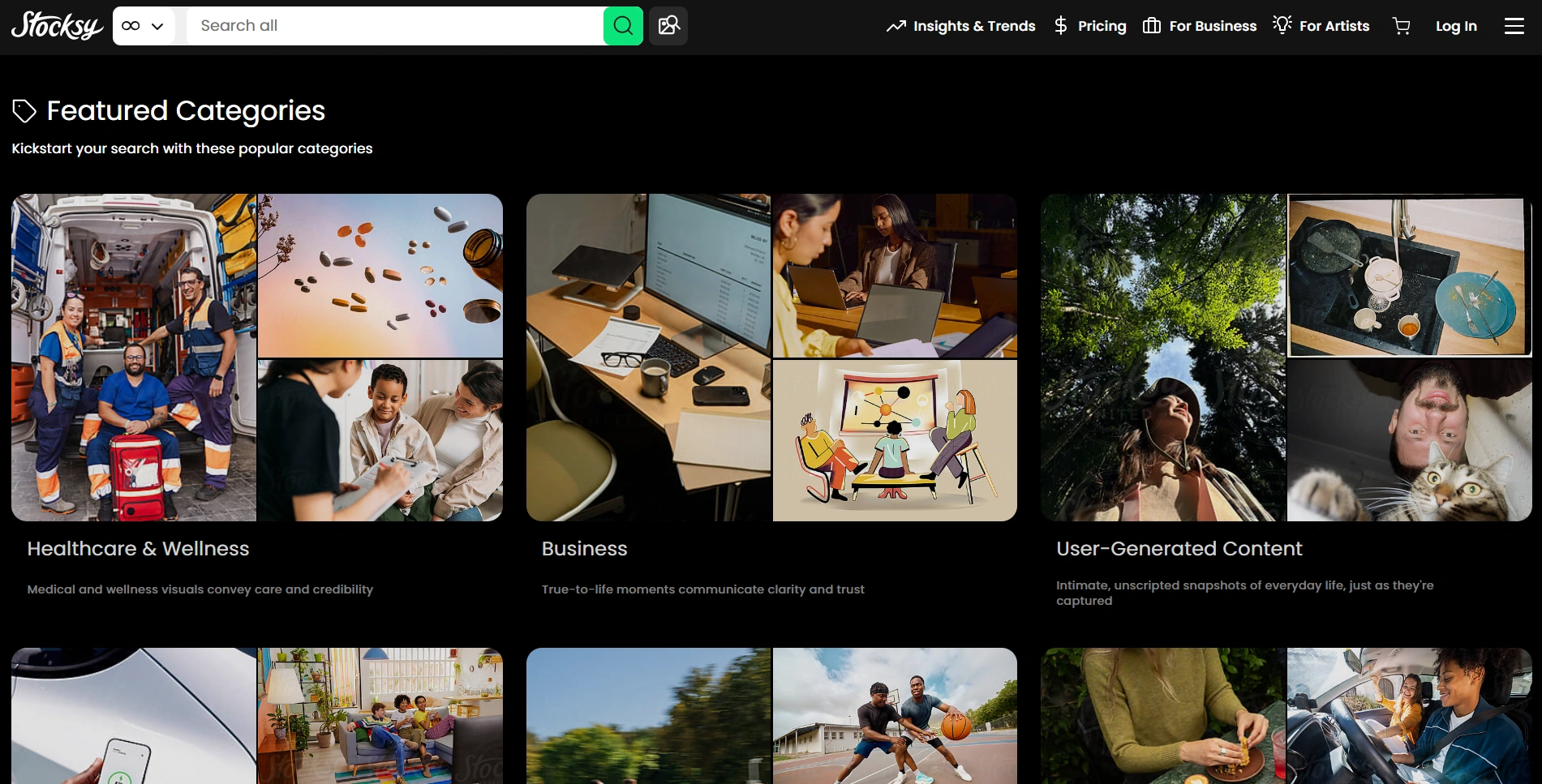
Do not assume every asset sold by a stock marketplace is a traditional photograph. Adobe Stock also accepts labeled generative AI submissions. If your reason for choosing stock is photographic provenance, examine the asset’s labeling and source—not just the marketplace name.
Licensing, copyright, and client trust: the trade-offs you cannot skip
Three separate questions belong in every professional workflow: May we use this image? What rights can we claim in it? And what will the audience reasonably believe it represents?
Stock is a license, not unrestricted ownership
Royalty-free does not mean free of charge or free of restrictions. It describes a licensing arrangement, not permission to do anything with the file.
For example, Adobe Stock’s license comparison distinguishes standard and extended uses. Standard licenses restrict certain merchandise uses and impose limits on some forms of reproduction. Assets labeled Editorial Use Only have separate restrictions and are not ordinary advertising assets.
Client reuse deserves attention, too. Adobe’s terms distinguish transferring a license to a client from using the same license across multiple clients. Keep the asset ID, purchase record, license type, and intended client with the project files.
Also, do not promise stock exclusivity unless you have specifically secured it. Stocksy’s licensing guide explains the difference between ordinary nonexclusive licensing and its market-freeze option.
Free imagery needs similar care. Unsplash’s terms distinguish the photograph’s copyright license from rights involving recognizable people, trademarks, and depicted artwork. A free download is not a universal clearance certificate.
AI commercial use and AI copyright are different questions
A provider allowing commercial use does not automatically mean you can claim copyright in every generated element.
The U.S. Copyright Office’s report on AI copyrightability explains that prompts alone do not establish sufficient human authorship of generated output. Human-authored expression, creative arrangement, and modifications may be protectable, evaluated case by case. Including AI material does not automatically make an entire human-designed work unprotectable.
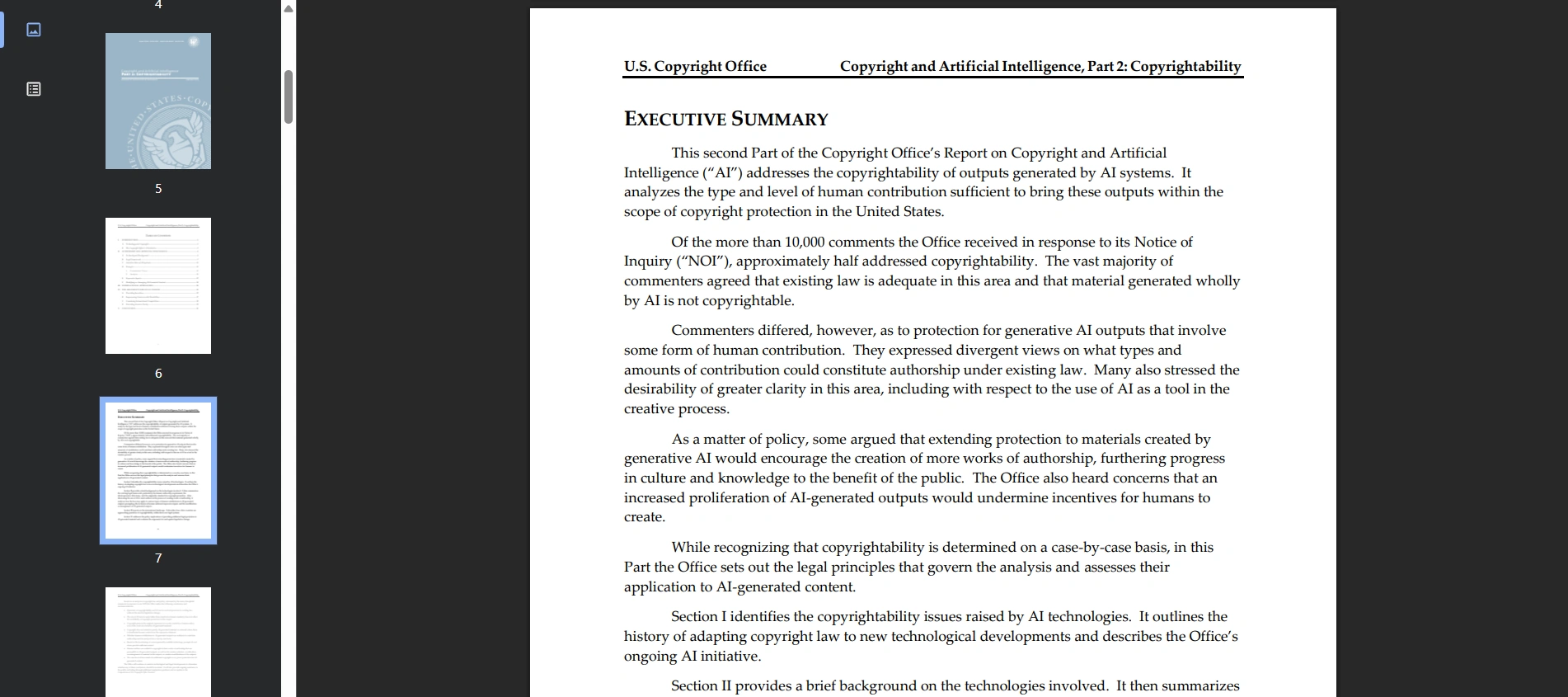
For designers, the practical lesson is to avoid promising exclusive ownership of raw AI output. Preserve your original photography, illustration, typography, layout work, and editing records, and obtain legal review when a contract demands specific ownership or exclusivity guarantees.
Reference-image permission is part of the brief
Use reference assets you are authorized to upload and use for the proposed work. Do not assume that finding an image online—or even licensing it for a different purpose—settles that question.
Adobe’s Generative AI User Guidelines prohibit infringement of third-party rights and require judgment when validating outputs. They also address sensitive information and Content Credentials.
Working inside Photoshop does not mean every reference remains local. Adobe’s partner-model documentation explains that prompts and uploaded reference files are shared with the selected provider to generate results. Obtain client approval before submitting unreleased products or confidential material, and check the applicable service and organizational policies.
Be clear about what the image represents
Agree with the client on AI use and disclosure before final production. An invented conceptual background is different from an invented customer, facility, or product demonstration presented as real.
When a file contains Content Credentials, the Content Authenticity Initiative’s Verify tool can help inspect its recorded history. But provenance is not a truth detector: the C2PA explainer distinguishes validated provenance information from a judgment that the depicted content is true. Missing credentials do not establish that an image is a real photograph, either.
Keep a simple asset log covering source, model where applicable, references, permissions, substantive edits, and final approval. It is far more useful at handoff than a folder named final-final-actually-final.
Run a small comparison before committing the whole project
The best way to choose is to compare routes against one actual brief—not against an abstract opinion about AI or stock.
Take a representative deliverable, such as a homepage hero or a product campaign tile. Define its required composition, subject, palette, copy area, factual constraints, and publication context.
- Find the strongest stock candidate, not the funniest bad example. Use preview assets for internal comparisons only where the library permits.
- Create a small reference-led AI set with deliberate compositional differences.
- If exact product or identity assets matter, build one hybrid version using the approved original assets.
- Place the candidates in the same finished layout with the same headline, typography, and call to action.
- Record the time and expense needed to make each route genuinely publishable—not merely presentable as a thumbnail.
Give both routes a reasonable exploration budget. A fixed timebox can help, but treat it as your working limit, not a claimed performance benchmark.

Use hard rejection criteria before subjective scoring
Reject anything with unresolved rights, misleading factual content, incorrect product details, or unacceptable brand changes. An impressive aesthetic score cannot compensate for a wrong label or a fictional safety feature.
Then compare the surviving candidates on:
- Message fit: Does the image communicate the intended idea without an explanation?
- Layout fit: Does it support the headline and maintain a clear hierarchy?
- Brand fit: Does it belong to this client rather than a generic category?
- Production effort: How much correction remains before approval?
- Campaign potential: Can the approach support related deliverables without falling apart?
Review AI candidates at full resolution for anatomy, object joins, reflections, repeated textures, and product details. Review stock candidates for awkward crops, accidental competitor branding, inappropriate context, and the amount of visual compromise required.
Finally, evaluate the actual campaign. Related AI images can drift in color, lighting, or subject details despite shared references. Stock images from different shoots can clash just as badly. A collection of individually attractive images is not automatically a coherent visual system.
The strongest case for AI is not that it eliminates designers or guarantees perfection. It is that it gives designers a more flexible starting point: imagery shaped around the brief, guided by approved assets, and developed through intentional iteration.
Use AI as your default for scenes that need to be designed. Use photography when reality, an existing excellent image, or a client requirement makes it the better answer. Use both when precision and invention need to coexist. And retire the meeting-room high-five unless your brief specifically concerns people who have just discovered meetings.